



It’s a Fiat 500e BEV, equipped with a Secure Gateway (SGW). Anyone familiar with modern Stellantis vehicles will know that the SGW acts as a network security controller, preventing unauthorised diagnostic access to certain vehicle systems.
Many aftermarket scan tools — including those within the Topdon ecosystem — now offer built-in SGW unlocking capabilities. For many repairs, these tools are perfectly adequate and offer fast access to vehicle systems.
However, this particular vehicle was presenting with a high voltage system concern, and when dealing with HV systems it is always wise to ensure the correct tooling is used.
This is something worth repeating:
There is no single tool that is right for every job.
In professional diagnostics, every tool has its place, and selecting the correct tool for the task is what separates efficient diagnostics from guesswork.
Given the nature of the fault and the potential need for deeper system interaction, we decided that Stellantis’ official WiTech 2.0 platform would be the most appropriate solution.
Preparing the Setup
Our interface of choice was the Topdon RLink, used in J2534 passthrough mode.
Before connecting to the vehicle, we first ensured the system environment was correct.
Within the RLink Suite, we confirmed the software was running the latest available version. Keeping the suite updated is important, as it ensures the newest manufacturer drivers and compatibility improvements are installed.
Next, we verified that the WiTech driver package within the RLink Suite was fully up to date.
With passthrough interfaces, outdated drivers are often the root cause of communication issues, so this is always a critical step before beginning any manufacturer software session.
On the software side, we ensured all required Stellantis subscriptions were active. This included:
- WiTech 2.0 access
- Tech Authority subscription
- Fiat service information access
It’s important to clarify a common misunderstanding here.
While passthrough interfaces like the RLink provide the hardware communication layer, all manufacturer software access is controlled entirely by the vehicle manufacturer. These subscriptions have nothing to do with the VCI manufacturer and must be purchased directly through the official Stellantis platforms.
With everything prepared, we connected the RLink to the vehicle and launched WiTech 2.0.

Initial Connection
Within minutes the system had successfully connected and authenticated.
The Secure Gateway was unlocked through the official WiTech authentication process, granting full access to the vehicle networks.
Immediately the platform began mapping the vehicle topology.
One particularly impressive element was the network visibility.
The Fiat 500e in this configuration operates across three separate CAN channels, forming a multi-network architecture typical of modern EV platforms.
Many J2534 interfaces are limited in how they display and interact with these networks, often only presenting two CAN channels simultaneously.
However, the RLink handled this configuration without issue, presenting a full topology view across all three CAN networks directly within WiTech.
Communication between the interface and the software was stable and faultless, allowing us to freely navigate modules and begin deeper diagnostic work.
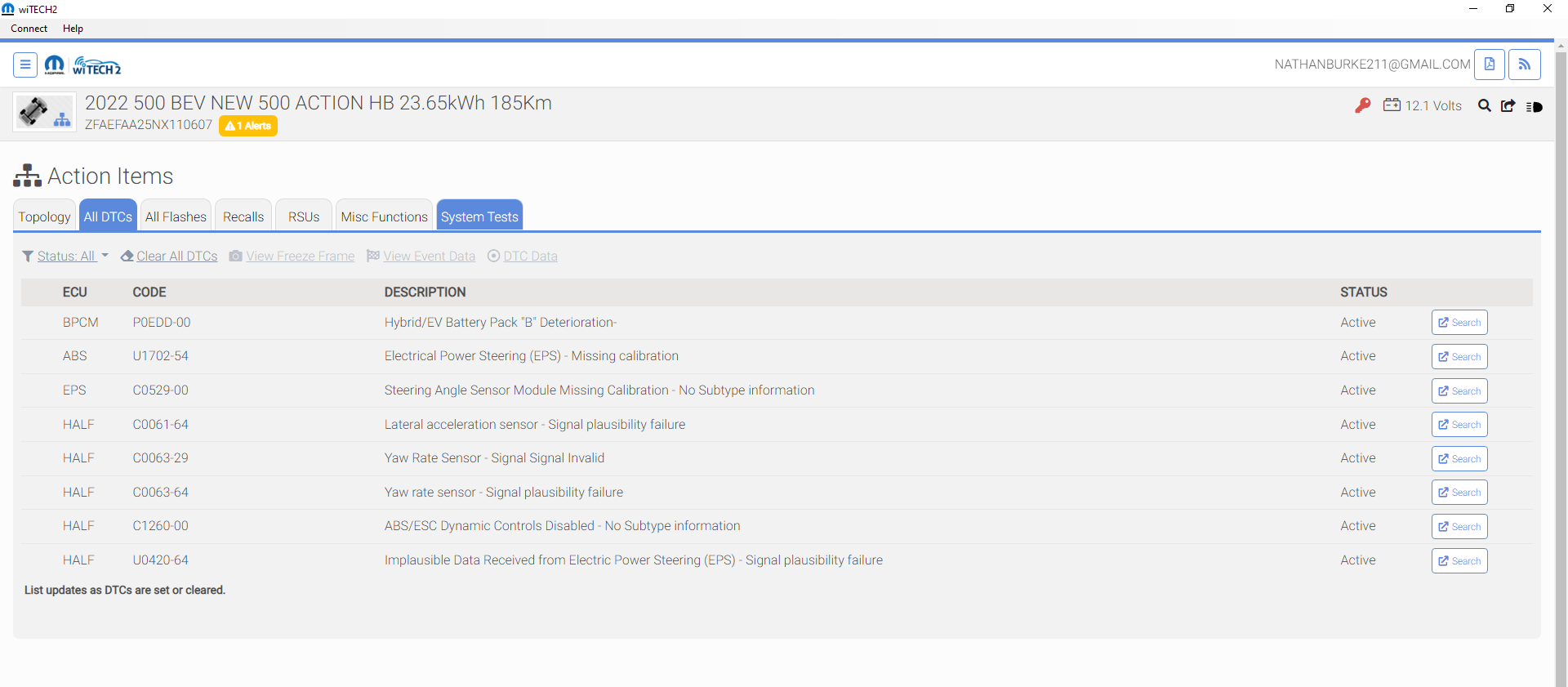
A Possible Reason for Previous Reports
One interesting detail during the setup process was that WiTech itself required an update before we could begin.
This is worth mentioning because it may explain some of the issues reported by other technicians.
Manufacturer diagnostic platforms evolve constantly, and compatibility improvements for passthrough interfaces are frequently introduced through software updates. If technicians are attempting to use older versions of WiTech with newer passthrough drivers — or vice versa — this can easily create communication problems.
After the update completed, the system behaved exactly as expected.
This suggests that at least some of the reported compatibility issues may not necessarily be caused by the VCI hardware, but instead by software version mismatches between WiTech and the passthrough drivers.
Getting to Work
With full communication established, we were able to begin diagnosing the vehicle.
The fault condition pointed toward a high voltage system concern, and the vehicle was presenting a situation that ultimately required battery removal with the vehicle reporting just four miles remaining on the system countdown.
Access to the factory platform allowed us to view the complete system topology, interrogate HV-related control modules, and begin the structured diagnostic process required for this platform.
At this stage, having the official manufacturer software environment becomes invaluable. EV architectures are increasingly complex, and guided diagnostics from factory software can dramatically reduce diagnostic time while ensuring procedures are carried out correctly and safely.
Final Thoughts
The takeaway from this case study is an important one.
In the world of professional diagnostics, tool selection matters.
Aftermarket tools have become incredibly powerful and capable, often providing faster workflows for common repairs. However, there are still situations where manufacturer software is the correct and safest approach, particularly when dealing with advanced systems such as high voltage EV architectures.
Equally important is understanding that passthrough interfaces rely heavily on correct software environments. Keeping drivers, interface software, and manufacturer platforms fully updated is essential for stable operation.
In this particular case, the Topdon RLink working through WiTech 2.0 performed flawlessly, providing full network access and stable communication across the vehicle’s multi-CAN architecture.
Sometimes the problem isn’t the tool.
Sometimes it’s simply making sure everything is configured, updated, and used the way it was intended.