





How to Use Topdon RLink J2534/Rlink Lite with Ford FDRS for SCR System Inductment Resets?
Modern Ford diesel engines equipped with Selective Catalytic Reduction (SCR) systems rely on complex aftertreatment monitoring and dosing strategies to meet emission standards. Following any repairs within this system — such as replacement of the AdBlue injector, pump module, tank assembly, or SCR catalyst — it’s critical to perform the appropriate control module adaptations and inductment resets to restore proper functionality.
This article outlines the complete process of performing these resets using Topdon’s RLink J2534 or RLink Lite in conjunction with Ford’s FDRS (Ford Diagnostic and Repair System). The RLink platform provides the flexibility of a professional-grade, OEM-compatible J2534 pass-thru interface with full DoIP (Diagnostics over Internet Protocol) capability, enabling independent technicians to carry out the same level of service as a main dealer.
1. Preparing the DMS System and Device Setup
Before launching into FDRS, the first and most important step is ensuring your RLink hardware and Topdon DMS (Device Management System) are correctly configured. The DMS acts as the control centre for your RLink interface — handling firmware updates, driver installation, and connection management between the J2534 hardware and your diagnostic PC.
Once your RLink is connected to the PC via a stable USB cable (avoid using unpowered hubs), open the DMS application. Allow it to detect the connected device — this will appear under the “Device List” tab with its serial number and firmware version displayed. If any firmware updates are available, apply them before proceeding.

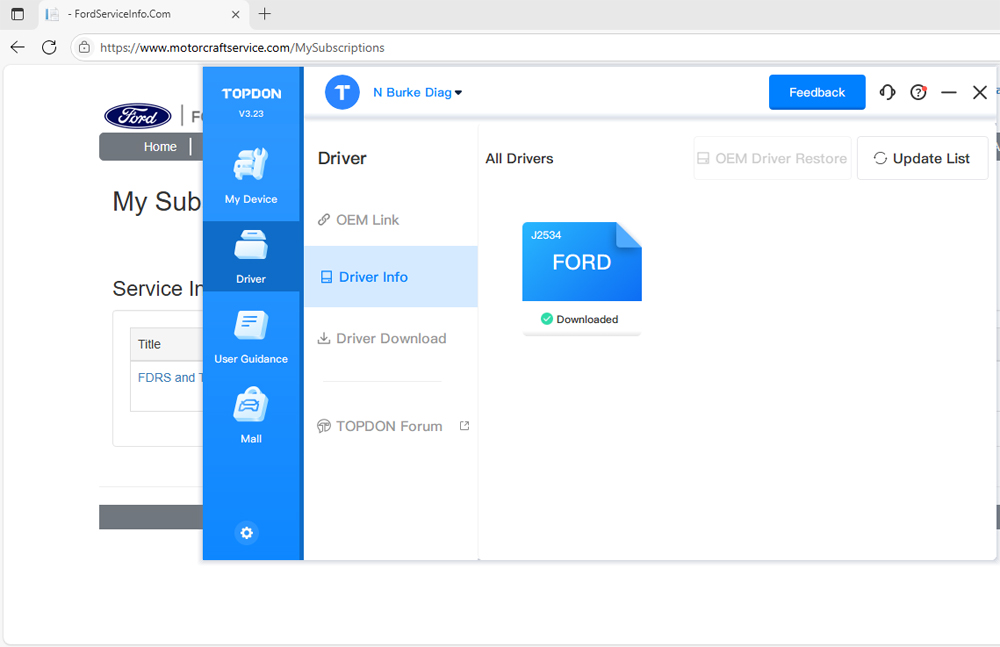
Next, navigate to the “Driver Management” section within DMS. Here you’ll need to download and install the dedicated Ford J2534 driver package. This driver ensures that the RLink is recognised by Ford’s FDRS software as a valid pass-thru interface and that the correct communication protocols (CAN, ISO, and DoIP) are configured.
2. Launching Ford FDRS and Logging In
With the hardware side prepared, launch FDRS (Ford Diagnostic and Repair System). This is Ford’s current diagnostic platform used across their newer model range, replacing IDS for most vehicles from approximately 2018 onward.
Upon opening FDRS, log in using your Ford Professional Diagnostic Subscription credentials. If you’re a trade or independent repairer, you can register for a short-term or single-day license via Ford’s Motorcraft Service portal. The login allows access to the full range of diagnostic routines, service functions, and module programming features authorised for your subscription tier.
Once logged in, FDRS will open the Vehicle Connection window. At this point, ensure your vehicle ignition is switched ON (engine not running) and that the RLink remains connected to the PC via USB.

3. Selecting the RLink as the Active VCI
In the connection window, select “Other Devices” from the list of available interfaces. This is the correct option for third-party J2534 tools such as the Topdon RLink. When prompted to select a specific device, choose “Artidiag RLink” from the list.
Selecting the RLink ensures FDRS communicates using the J2534 protocol stack supplied via the Topdon DMS driver, enabling full compatibility with Ford’s communication architecture.
For modern models using DoIP (Diagnostics over Internet Protocol) — such as the Transit Custom, Ranger, Focus Mk4, and Puma — the RLink’s advanced Ethernet-based communication provides a significantly faster and more stable link compared to older CAN-only interfaces. This is particularly beneficial during data-intensive routines such as SCR parameter resets and module programming.
Once selected, click “Connect” and allow FDRS to establish communication with the vehicle.

4. Network Test and System Scan
After connection, FDRS automatically performs a Network Test. This process scans all vehicle networks (HS-CAN, MS-CAN, and DoIP as applicable) to verify communication with each control module. The test results are displayed in a grid, highlighting any modules that fail to respond or show stored fault codes.
Once the network integrity has been confirmed, FDRS will display the list of detected DTCs (Diagnostic Trouble Codes) across all systems.
If the SCR system has recently been repaired — for example, due to DTCs such as P20EE (SCR NOx Catalyst Efficiency), P207F (Reductant Quality Performance), or P204F (Reductant System Performance) — you should see these codes stored within the Powertrain Control Module (PCM). These codes often trigger AdBlue warning lights or countdown messages, requiring specific reset procedures after the physical repair.


5. Performing the SCR Inductment and System Resets
With the network test complete, navigate within FDRS to the PCM (Powertrain Control Module). Under the “Service Functions” or “Special Tests” tab, you’ll find a series of SCR-related procedures. The exact names may vary slightly by model, but typical options include:
- SCR System Inductment Reset
- Reductant Quality Reset
- SCR Dosing Test / Leak Test
- AdBlue Level Recalibration
- NOx Sensor Replacement Routine
Select the applicable reset corresponding to the work you have carried out. For example, if the reductant injector or tank assembly has been replaced, the Inductment Reset is the correct choice.
FDRS will prompt you to confirm ignition status and vehicle readiness before executing the function. The reset procedure clears learned values, reinitialises the dosing strategy, and synchronises the SCR catalyst model within the PCM.
Upon completion, FDRS will display a success message confirming the routine has run correctly. You may then proceed to clear all DTCs from the PCM and re-run the system scan to ensure no active or pending faults remain.
Finally, verify that all AdBlue and engine warning lamps have extinguished, and that no service messages are displayed on the cluster. A short test drive may be necessary for the PCM to perform its initial closed-loop checks and confirm catalyst efficiency.

6. Summary
Using the Topdon RLink J2534 or RLink Lite with Ford FDRS provides independent technicians with full OEM-level diagnostic and reset functionality — including SCR inductment procedures critical to emissions system repairs.
By correctly setting up the DMS environment, installing the Ford J2534 driver, and selecting the RLink within FDRS as the VCI under “Other Devices”, technicians can achieve seamless communication with both CAN and DoIP-based Ford platforms.
This process ensures that after any SCR system repair, the necessary resets can be completed efficiently, restoring the system to its intended performance and clearing any associated dashboard warnings — all without the delays or costs associated with dealership intervention.